The
Measuring Service Accounting System (MESA)
Version 2.4
Making
the paper work tasks of the product measurer simpler,
with
full work tracking and year to date
income reports.
Saving you time and money.
Written, Designed and Owned by
Space Coast Computers, Inc
Copyright 1999-2004
Introduction
The Measuring Service Accounting System program supports the task of measuring homes and offices for Carpet, Vinyl, Tile and other flooring products. It provides an electronic archive of all jobs and the associated drawings so work can be review and even old locations review for new work. In storing all the information about each measuring job, which the system refers to as a PO, the program generates invoices; Emails work totals to a District manager and provides income reports by week, month and year. The program provides the missing piece between all the job information and needed business accounting.
Table Of Contents
1.0 Features of The Measuring
Service Accounting System (MESA), Version 2.4.35
3.2 District or Regional Manager
Station
4.6 The Purchase Order or PO Screen
5.5 Transaction Codes to Description
5.6 Product Form Setup for stores
5.7 Assigning Standard Widths to
Products
5.9 Business Expense Category List
7.2 Schedule Work Control Form
8.0 Store Internet Web Site Download
8.1 View of Current Jobs to Download
10.1 Insurance Estimating Work Sheet
11.2 Annual Income Report with
Monthly Totals
11.4.2 Charge Back Payment List
1.0 Features of The Measuring Service Accounting System (MESA), Version 2.4.42
· Prints routing work sheets with customer information sorted by location or time
· Prints customer work sheets for drawings and calculations
· Prints extra works sheets needed for Home Depot jobs
· Stores Purchase Orders or Work Orders from store
· Provides an index of all customers
· Generates Income Reports by Day, Week, Month and Year
· Generates Profit and Loss Statement
· Generates Income report for year by Store
· Has Expense Ledger to track business expenses and report by Month and Year Totals.
· Can search on all fields of a Purchase order: customer name, address, PO Number, date, phone numbers, etc.
· Stores drawings with each job for later retrieval for new work at same site or to send via Email or FTP to store.
· Manages multiple measures under one business, separates reports of their work and totals for business.
· Sends work rollup reports for Home Depot jobs to district manager.
· Generate work sheets by product (Carpet, wood, vinyl, tile, etc.…) customized by store needs.
· Can send all job information and drawings to store when work is completed.
· Supports FTP of drawings and any customer signed sheets to regional web site with the push of a button.
· Can use Email to send drawings and customer job information to local or regional manager.
· Works with any scanner or fax software that supports the tif image format.
· Has Option to put local Map page and quadrant numbers or do an Internet look up to show the location on a Map.
1.1 Future options
· Interface with drawing program to eliminate manual house drawings and calculations of areas.
· Support distributing PO information to client measurers electronically
· Multiple drawings per PO, to track rework and customer changes.
· Track alternate Income in business total Profit and Loss Statement
2.0 Description
Before
flooring materials can be purchased, it is necessary for measurements to be
made. These measurements of an room,
show the size, form and area, this is used to determine the amount of materials
needed. Trained professionals, known
generally as “measurers”, make these measurements. MESA automates the processes of accounting, scheduling,
reporting and billing for these measurers to improve efficiency and to save
time and money. It In the case
of Home Depot, it tracks all work involved in receiving a the store’s
work orders (or purchase orders), logging the planned work, generating routing
sheets, work sheets, and the special forms required for Home Depot including
the special Home Depot forms for the Allstate Insurance Company. The system supports multiple stores and
keeps a list of all customers and the requested work. This provides an on-line history, which can be used to recall the
customer information for use for additional work, or for an estimate by a
different store. The program also
supports a WEB site interface where stores can post work, which can be
downloaded directly into the program.
The program saves time in business accounting, by keeping a record by store, all estimating work orders or Purchase Orders with customer information for end of week, month or year reports. All information such as: work orders, customer addresses and contact information, the list of products, standard widths are stored in tables for referencing and for entering a new work orders. This saves time when entering a new work order by providing pull down pick lists for automatically filling out common fields. The program organizes the work by creating a routing sheet that can be organized by time or by common locations. It saves time and money by reducing the number of faxes that are sent and received and it avoids the problems of reading faxes that have been sent more that once. It helps at income tax time by providing reports of work done for the year and, for the master version, it provides reports showing work done by each measurer including the commissions received.
It generates business reports of work done by week, month or year and a special report of work done in certain areas that are defined by their zip code. It supports an EMAIL and fax interface to send invoices to stores for work done. The main work sheet generated by the program is used to log work done at a customer site. It can be customized with different check items for each product to meet each stores needs.
To
eliminate faxes and mistakes that are made by transcribing faxed information
into the program, there is a web support option that allows stores to enter
estimating jobs online. Once entered,
the information can be transferred directly into MESA. This eliminates the store typing and faxing
the order then you having to retype the information into the program. It also provides a feed back report to the
store managers on-line, so they can see which jobs have been posted and which
jobs the measurer has picked up.
3.0 Product Versions
There are
three versions of the program, the Stand-alone, the Enterprise, and the Remote.
All products function the same and are centered on the Work/Purchase Order. The Stand-alone is for an individual independent measurer, the District version is for someone that measurers and also has other measurers working for them. Supporting the Master version is the Remote version for the measurers that work for the District manager.
An optional feature is the web interface. The web interface allows stores to post work using a web form during the day, then that night the jobs can be downloaded into the program. The program has a entry screen, the PO screen, for normal posting of Work/Purchase orders.
.
3.1 Stand-alone Version
This is the basic version. It allows a measurer to track their work orders for measuring jobs. It provides all business reports, generates the job routing schedules, and work sheets. The system tracks work from each store that issues a purchase order. It allows the store the option to use, or not use, a purchase order number. The customer information is stored with the work order. This allows online retrievals for return work, providing search options on any field such as: name, address, date, phone number, etc. The user in this version can update all reference tables; products, standard widths, options for work sheets and, business information tables.
The stand-alone version can produce all reports
3.2 Enterprise Version
The Enterprise Version supports a District Manager and has all the features of the Stand-alone version. In addition, it has the ability to export purchase orders to a web transfer buffer for downloading by a specific remote measurer, using the Remote Station version. It can also import from the transfer buffer Pos posted by the Remote Station or from the store web input screen.
The District Manager Station configures all control files. The control files are the tables like the list of Stores, the options on the reports, the business slogan. It tracks work done by all measurers and provides reports totals of all work done, work done for measure at District Station, and by each remote measurer.
The District Manager Station can have other District Managers working and reporting to them.
3.3 Remote Version
This version works in support of a District Manager Enterprise Version. This version can enter new Work/Purchase orders directly into the program, or from work posted by a store for that remote measurer, or from Pos transferred up to the web from the District Manager Station. After working the PO the remote station can transfer via the web link the updated PO information back to the District Manager Station.
The Remote Station cannot change the program control files. They are updated from the District Manager Station and sent via the web interface to the remote stations. It can change its business information properties and run reports on the work done by the remote measurer.
3.4 Demo Version
A Free 60
day Demonstration release for each product version can be provided. Just fill out our demonstration request
form, download the software and we will send you a 60-day license key. If the product meets your needs, you can
purchase a license and convert your demonstration copy into a production
release and continue with the information already entered.
3.5 Product Upgrades.
The Remote Version can be upgraded to Stand-alone keeping the remote measurer information as the Stand-alone measurer. The Stand-alone version can be upgraded into a District Version, keeping the Stand-alone information as the District business and the prior work done as one of the measurers managed by the District Station.
3.6 Software Support
For the first year after purchase, the program is upgraded to latest release in the version series, such as 2.x, free. Maintenance contracts are available. Version upgrades will be sold at great discount to valid customers.
4.0 Menus
The Measuring Service Accounting System is a menu driven software application designed to make scheduling, measuring jobs, job tracking and, business accounting as simple as possible. The program has three main menu screens and thirteen support screens. The Main Menu (Figure 1, below) lists the key input form. The Purchase Order screen is shown in Figure 6.
The Other
Information Menu is shown in Figure 2.
The last general menu is the Product Information Menu, shown in Figure
3. It shows the Product List and
associated standard material sizes for each product. The key Company Information Form is shown in Figure 8. The Company Information Form has the name,
address and other information used for reports and display in the program.
The Business
Reports shown in Figure 17 are used for business accounting. Figure 18 shows the form to view the
activity report to send to Home Depot or to generate a generic Invoice to other
companies. Work Schedule is shown in
Figures 21 and 22. They are used to
schedule measuring jobs, reschedule if needed,
and then close the job.
4.1 Opening Menu
This is the program’s opening menu.
From this menu, you Enter and Exit all options for the program. The first option is the main work screen for
entering Purchase Orders or store Customer Job information. The next selection goes to the program
configuration options. After that are the selections to run business reports,
enter and close work schedules, and generate invoices. The last two options work with the Store WEB
option, to view jobs posted to web site by store both waiting to be downloaded
and the ones that have already been downloaded..
The program displays the business name at the top of each form and the Version control number under the business graphic.
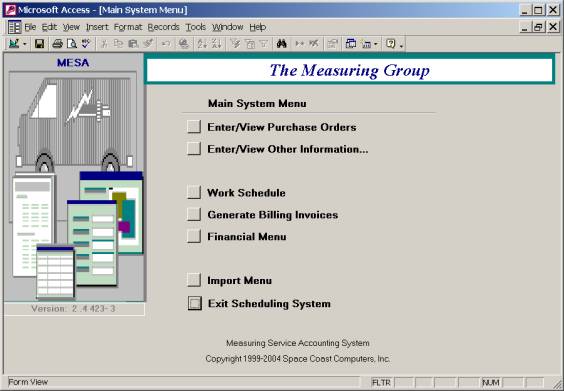
Figure 1
4.2 Other Information Menu
The Other Information Menu is shown in Figure 2. It is used to control the actions of the program, identify the business name, address, owner, measures, Products sold, and other control items. These options are described later.
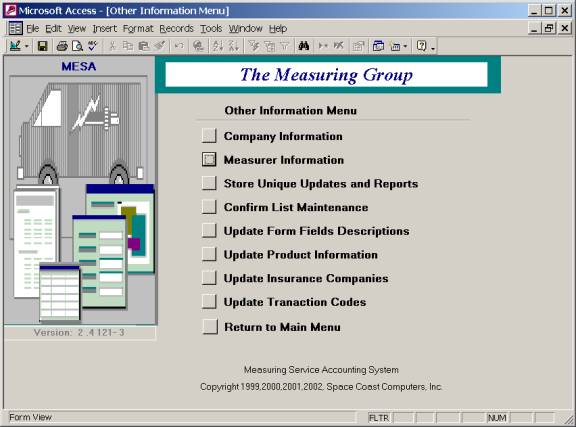
Figure 2
4.3 Product Information Menu
This allows access to the two configuration tables for the products sold and standard widths of the products sold. These are detailed later.
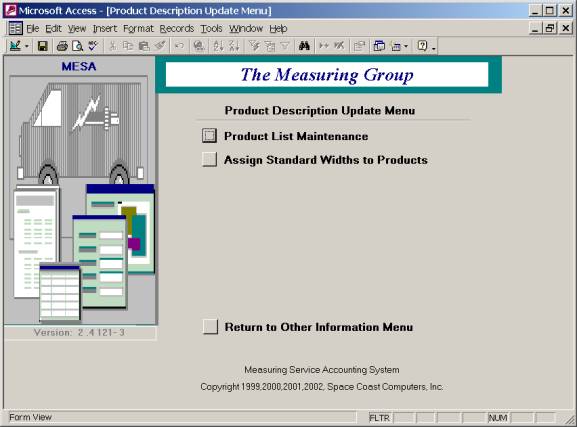
Figure 3
4.4 The Financial Menu
This menu provides access to the business expenses input ledger, the table of business expense categories and Expense Reports.
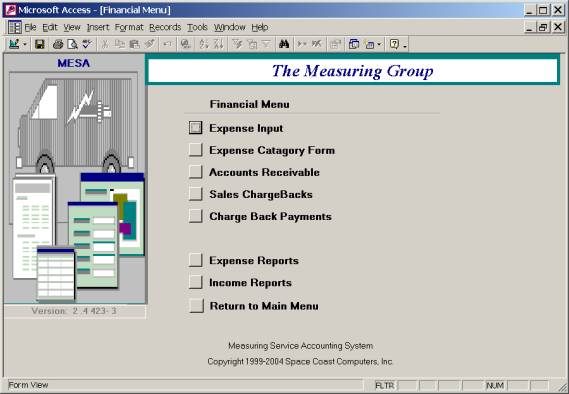
Figure 4.
4.5 The Import Menu
The system can import jobs from a WEB Site or can receive jobs completed by a remote measurer and import those jobs via an EMAIL from the remote measurer.
This menu lets you view new jobs posted on the WEB waiting to be downloaded, or show the list of jobs that have already been downloaded. It also provides the same options to view new jobs received from the remote measurer that are ready to be imported, or view the history list of jobs that have already been imported.
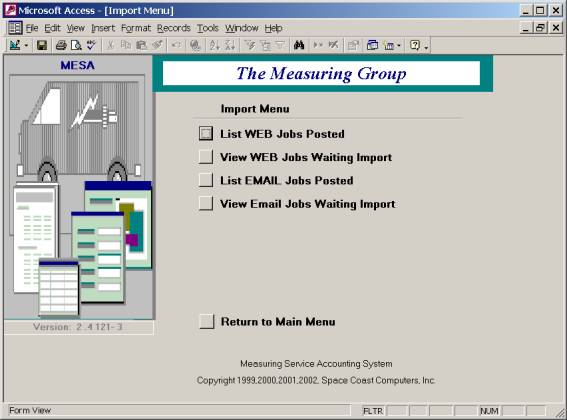
Figure 5
4.6 The Purchase Order or PO Screen
The Job
Purchase Order Entry Form is the heart input screen of the system. All information about a job is entered and
tracked from this form. This form
provides the who, what, when, where about the job. This form also shows the amount paid for the job. The District
version also shows the measurer.
The left side has the customer information, the center has the work order information, and the right side has the Store information. Also on the right side is, the search option, the list of drawings window and, the information about the expense and income. The Customer Work window is where the list of products, the installation areas, product width and repeat information is stored. A work sheet is printed for each product type using the View Work Sheet(s) option. The View Drawings label and Button are enabled when there is a drawing(s) stored for this job. The Email Drawings to Store button is a duel function button depending on the store options. If the store wants drawings Email the button say Email and send the drawings by Email to the Store Email account. If the store wants drawings send to their WEB site, the button reads FTP drawings to store, and uses an FTP process to send the drawing to the store WEB site. In both cases, the drawing name is changed to the PO number.
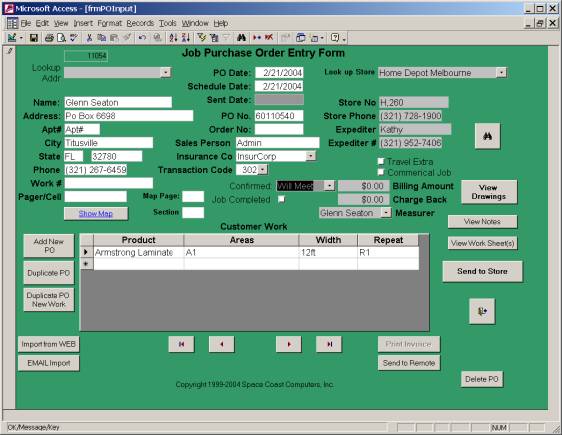
Figure 6
Once a job has been completed and logged, the Job Completed button is turned on. When the jobs is completed, the form is locked to prevent accidental changes to the information on the form.
As and alternate to a map book with Page and Section information, after the Address information has been entered, the Show Map, button will turn on. This will automatically open your Internet Browser, go to Yahoo Maps and display the map showing the location of that job. Note you are required to be On-Line for this to work.
4.7 Expense Entry Form
This is the business expense ledger.
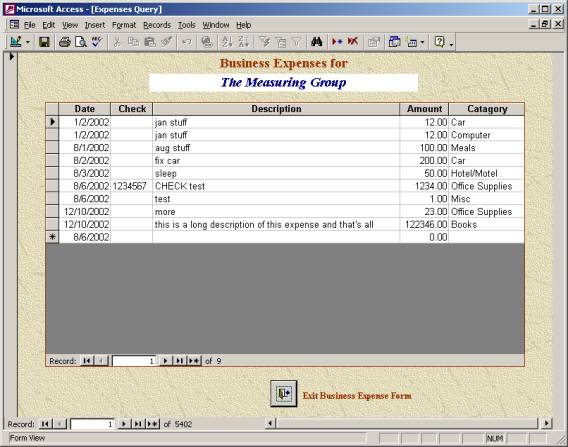
Figure 7
5.0 Program Setup
This section shows the different
setup screens that configure the operation of the program. There are three areas, the Company
Information form, the Measurer Information form and the individual Store
forms. The last setup area is the
control all the lookup tables. These are the tables control the options of the
different from Insurance companies, to options on the different work sheets and
reports.
5.1 Company Information Form
This is the main configuration control form. The entry Company Name is the name you establish as the Business Name. Its address appears on all the reports. The master Measurer ID is part of the business information with the District number. The measurer ID on this form is verified with the License Number. The company slogan appears at the bottom of the Invoices.
There are three drawing folders to tell the system where to find drawings for each Purchase Order entered. The normal usage would be to put new drawings into the Drawing Path, and then after backups are done, the files are moved to the folder pointed to by the Local Archive Path. Drawings can also be saved to a CD if a CDRW drive is available. The normal program usage is for Drawing Archive to be the CD ROM drive letter. The CD would contain older drawings that are no longer in the Local Archive Path. The system checks access to the folders and turns on the path failed box at the end of each path. This failed flag is used to keep the system displaying errors every time it tries to view the drawings stored there.
The Email area is for sending reports by e-mail. The Email Name is the easy to read Name that shows up when you receive Email to show who the mail was from. The Email Address is the address of your personal Email Address or business Email Address. The Email address would be used if someone wanted to send you Email to ask a question about the report you sent. The Email Server is the SMTP Relay host is usually provided by your ISP and used to configure your personal Email settings as SMTP Address. It is required here to allow you to send e-mail from inside the program. The Bulk Email address is that of the recipient of the work reports. The Transfer values support the Master Station providing the email address and account used to transfer PO information and drawings from Remote Stations to the Master Station.
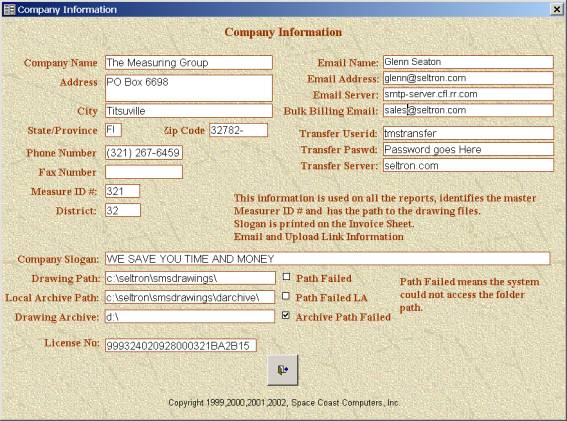
Figure 8
5.2 Measurer Information
The System supports one Master Measurer and multiple supporting Measurers. The Measurers Information form has the information about each measurer. The first measurer is the business owner information. The left window shows the list of measurers. Selecting one of the measurers in the list displays their information. The “Is Independent” flag is for a measurer whom works for you and you track, but do not pay commissions.
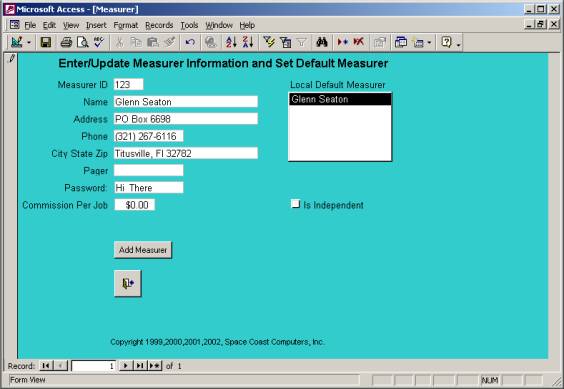
Figure 9
5.3 Setup Store Information
All work done by a measurer is setup to be done for a store, such as Home Depot. The Store Information Work Sheet adds the store to the Store list on the PO Screen. The information this form is printed on reports, used to calculate money made per measure and it indicates where drawings should be sent by FTP or Email. Only the Store Number (Store No) must be unique.
The WEB URL is the address were drawings should be sent as captured from the WEB Browser. If the WEB URL is used and is in the correct format as show in image below, the address, folder and User ID will be extracted and those fields filled in automatically.
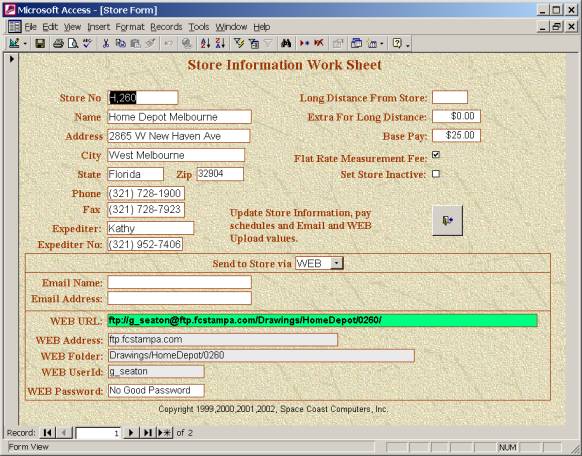
Figure 10
5.4 Insurance Company Setup
The
Insurance Company Setup form lists the insurance companies. This table makes sure spelling is consistent
for searches and is used to identify special forms required by the insurance
company. You can add or delete
insurance companies from this list.
This list shows up on the PO screen as a pull down list.
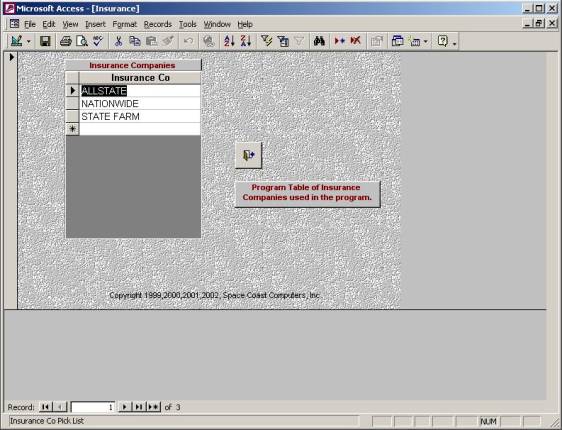
Figure 11
5.5 Transaction Codes to Description
Transaction Codes are the work codes that translate a type of job to the job code number.
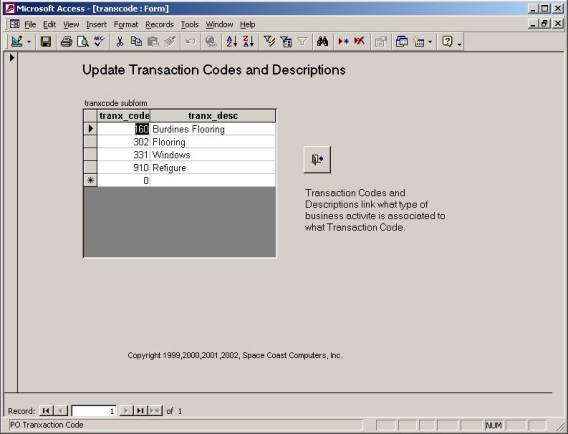
Figure 12
5.6 Product Form Setup for stores
This form is created automatically when you add a store. It controls all the different options at the bottom of the job work sheet. If a store does not want to see all the options you can delete them from the work sheet for that store here. It is recommended that you do not change this form.
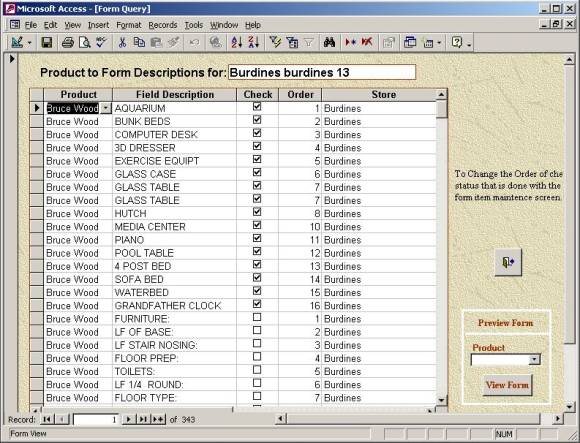
Figure 13
5.7 Assigning Standard Widths to Products
This is the standard list of widths associated with a product. This table would only need changing if you added a new product line or a standard product came in a new standard size.
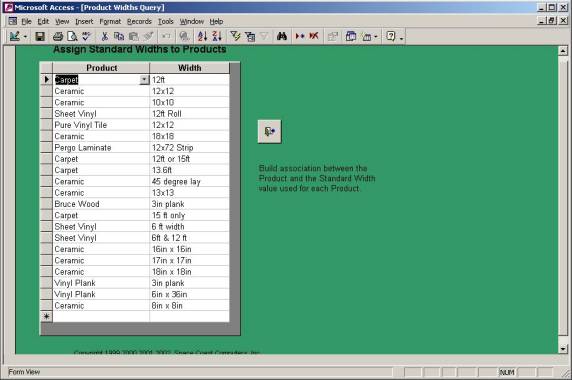
Figure 14
5.8 Business Product List
This table lists the different products with their abbreviations. The abbreviation is used on the work routing sheet to save space printing all the daily jobs. It also flags when printing the product, if the width needs to be printed also and in what units.
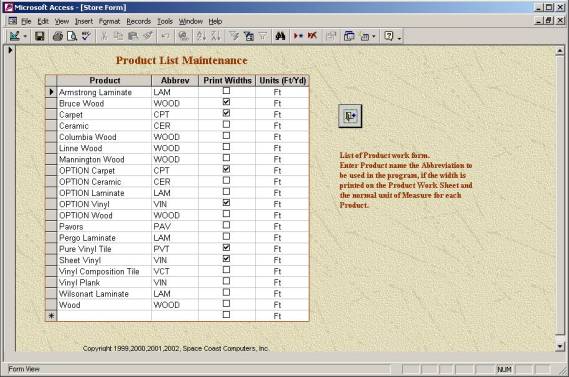
Figure 15
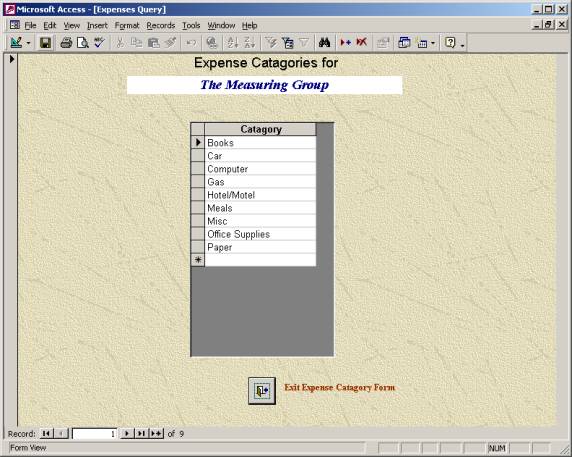
5.9 Business Expense Category List
This list is the pick list for Business expense category organization. Items must be added to this list to appear as an option in the Business Expense Ledger.
Figure
16
6.0
Reports and Invoices
6.1 Income Reports
The Business Reports shown in Figure 7 are used for business accounting. The menu provides work reports by week, month, year and measurer.
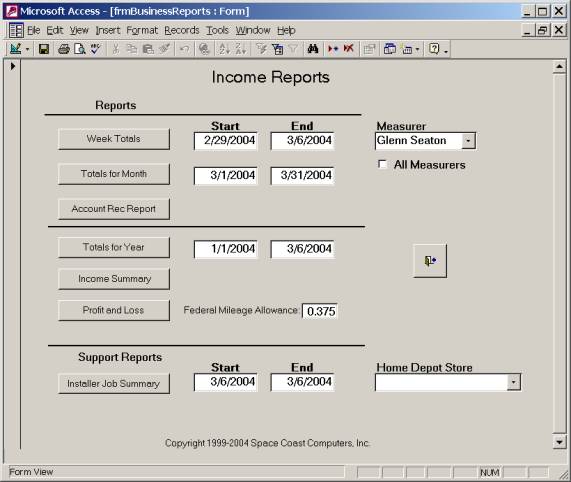
Figure 17
In the first section, Income report show gross income projections based on work scheduled and completed. Payment may not have been received for this work yet. The Account Receivable Report shows work with payment due. The Income Summary shows Income projection by store and the Profit and Loss Report show actual income and expenses.
The Support Reports shows summary of the Home Depot work done during the specified time using their report summary format.
6.2 Invoice Generation Form
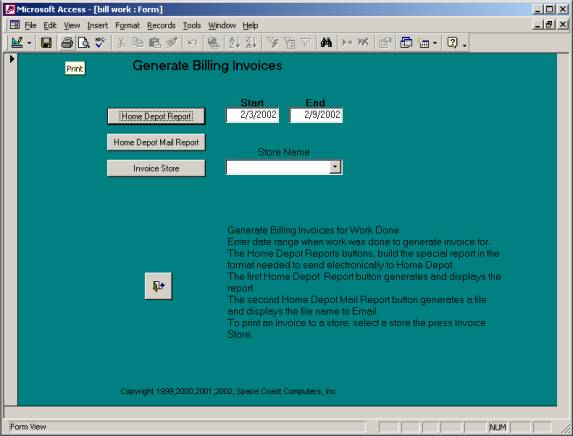
Figure 18
7.0 Work Scheduling
7.1 Scheduling Control Form
This form is used to schedule jobs once entered on PO Form. The job order can be scheduled by location or by time of day. The Routing Schedule is printed by map coordinate and then by time. The Bulk Work Sheets prints the product pages for each job and the Home Depot and Insurance forms as needed.
Once a job is completed or if it needs to be rescheduled, the Close Routing Schedule Sheet shown in Figure 11 is used. When closed, an option can be selected to email the information and drawing to the store.
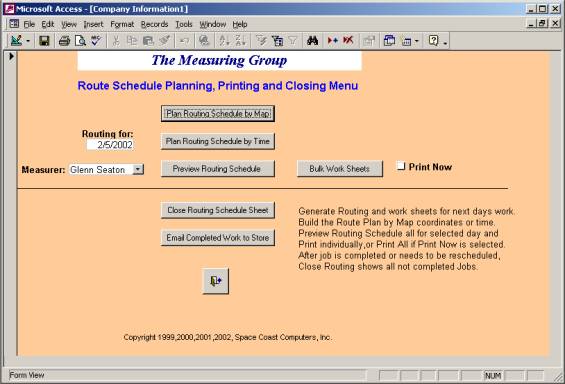
Figure 20
7.2 Schedule Work Control Form
There are two screens that show scheduled work by map location or by time of day. Both screens have the same fields. Once all the jobs are entered from the PO screen, this screen is used to set the time.
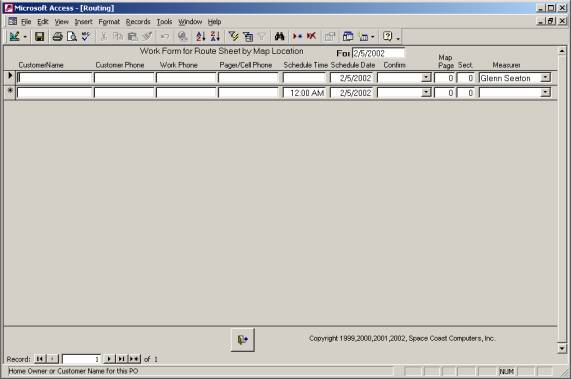
Figure 21
7.3 Close Routing Sheet
This from is used to
when a job is completed to check completed or reschedule. For completed jobs the billing options of
special commercial job, extra for mileage and if the job information is ready
to be sent to a District Manager.
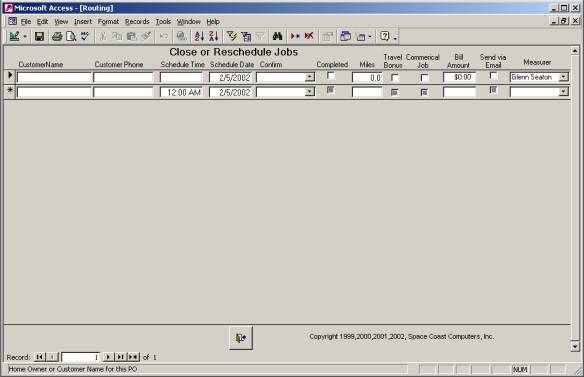
Figure 22
7.4 Routing Work Sheet
Once the customer has been contacted and the Work Schedule form updated, the work routing sheet can be printed. It can be printed by location or by time of day the job is scheduled. The information comes from the PO screen to show where the job is located, for whom the work is to be done, the list of rooms to be measured and, the scheduled time. A place is provided to log the mileage to the job.
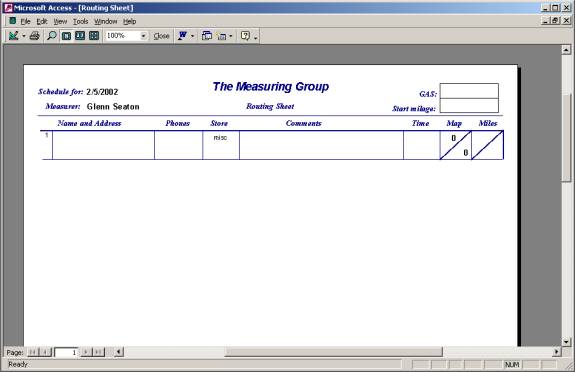
Figure 23
8.0 Store Internet Web Site Download
An optional feature of the system supports a web site where a store can enter a job by filling out the PO screen, which is then electronically transferred into the system. This eliminates typing the PO information from a fax copy. It provides feedback to the store that you received the job, which is something that is not provided by a fax.
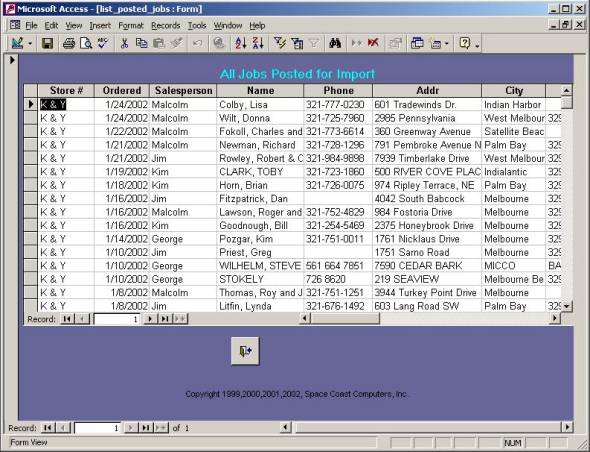
8.1 View of Current Jobs to Download
This screen would show jobs posted to the web site by a store ready to be downloaded.
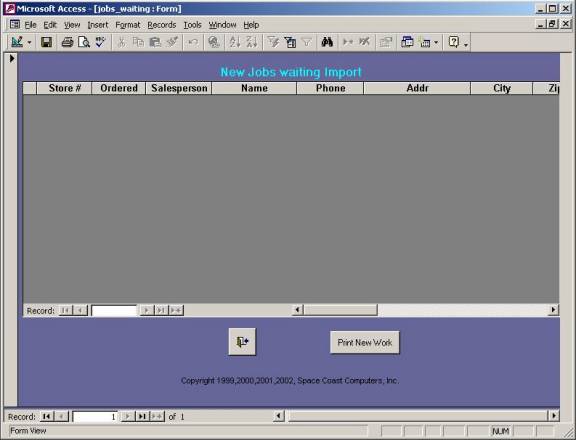
8.2 View Old Downloaded Jobs
This screen shows all the jobs send from the web site for the last three months. This allows a review of jobs posted to resolve any missing work for that store.
9.0 Remote Measures updates
The Email Import List allows remote measures to send a master station job information and drawings.
9.1 Email Import List
This screen is used to download import jobs from the server using the “Check for New EMAIL” Button. Once the information and drawings are imported into the program, this screen will show the jobs ready to be imported using the PO Input form.
.
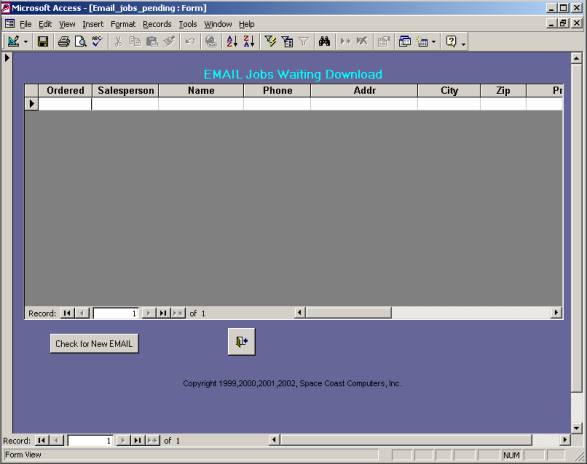
9.2 Email Import History
This screen
shows all the jobs send from the remote station(s) via Email to the master
stations. The emails can be kept online for as long as needed. There is an
option to get the program PO Input Form to reload the information, but any
attachment can only be transferred the first time.

10. Job Work Sheets
10.1 Insurance Estimating Work Sheet
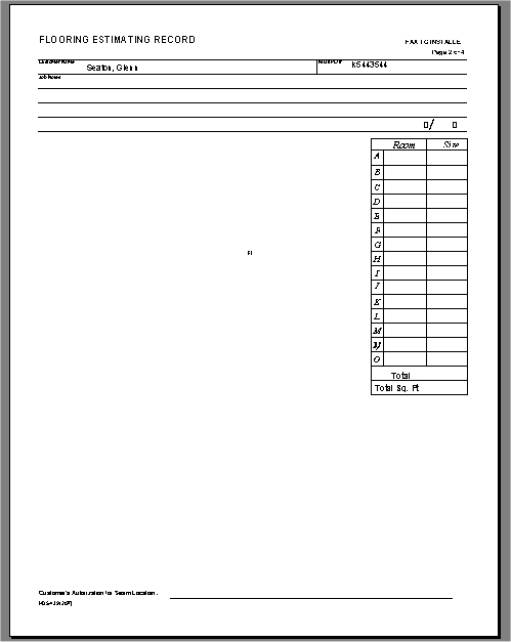
For Home Depot Insurance claims it prints both the Special Custom Work sheet in 10.2 it also prints the Home Depot Work Sheet.
The
program also prints the Home Depot Forms: 439 “Flooring Installation
Specifications” and Measuring Guide and the 546 “What you should Know
before the Installer Arrives”.
10.2 Measuring Work Sheet.
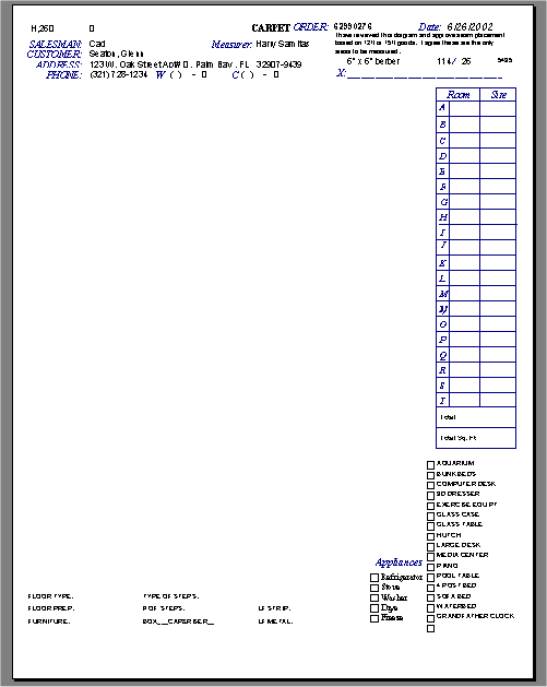
This is the MESA detail work sheet with customizable check boxes at the bottom and filled out name and address at the top.
11.0 Reports
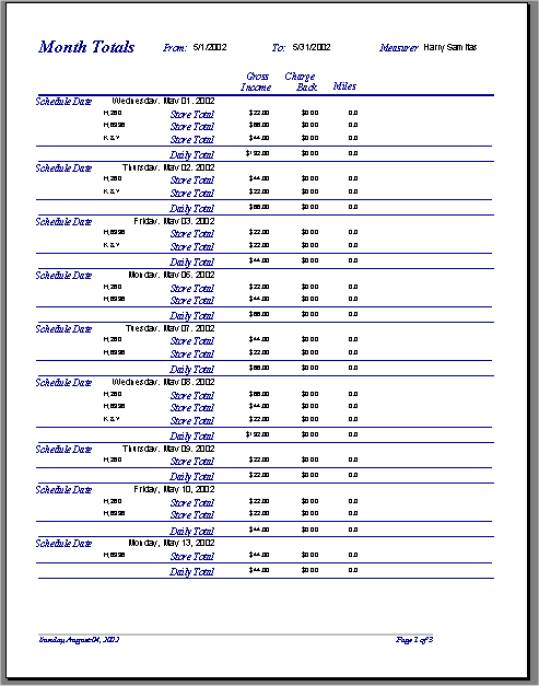
11.1 Monthly Balance Sheet
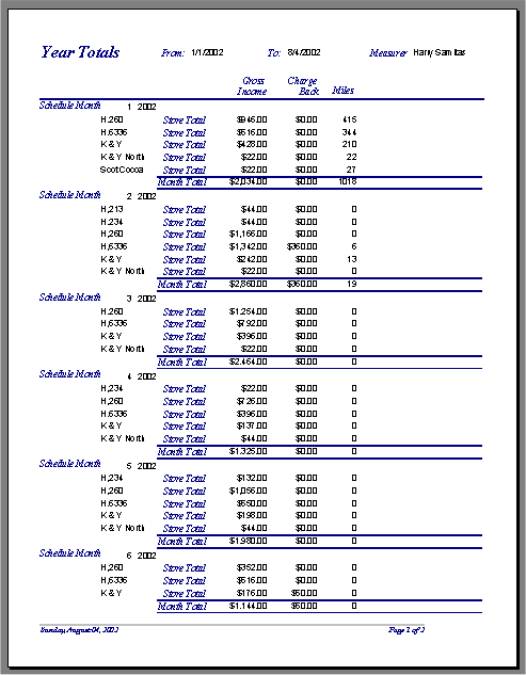
11.2 Annual Income Report with Monthly Totals
11.3 Business Expense Reports
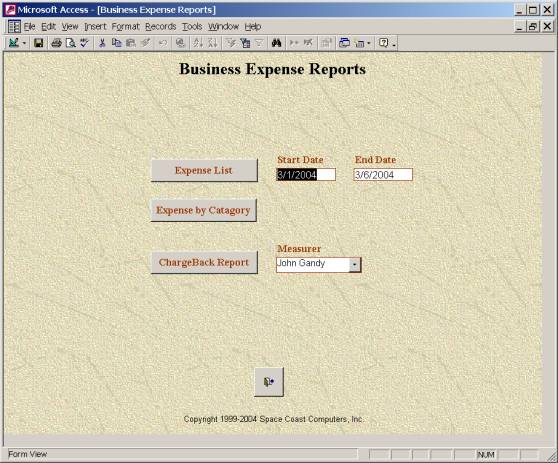
This form selects the date range and type of
business expenses you want. Entered
expenses or Charge Backs.
11.4 Charge Backs
11.4.1 Entry and Status Form
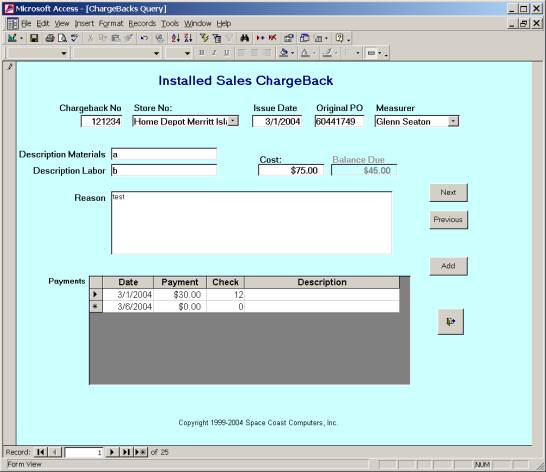
This form is used to enter and track Charge Backs. The charge back amount when entered on this form against a PO, it will show up on the PO form automatically.
11.4.2 Charge Back Payment
List
This form allows a single payment to be subtracted against several Chargeback numbers on a single screen.

Appendix A
Technical Data Flow Diagrams
Store Web Site Data Flow
A PO can be entered several ways. A new PO can be entered directly into any version of the program using the PO from, or from your special business web site for that store.
The special business web site lets you store customer enter a new PO online. This also allows the store to be able to track posted Purchase Orders, by which sales person, and if it has been downloaded by the measurer. It can be downloaded to any version of the program.
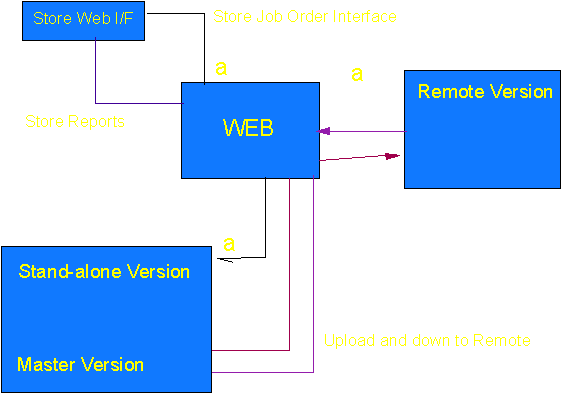
WEB Store Interface ( I/F )
The WEB Store Interface can provide a option for stores to enter PO/Work Orders on-line and eliminate faxing. Unlike the fax option, the on-line option provides feedback to the store that the job was received.
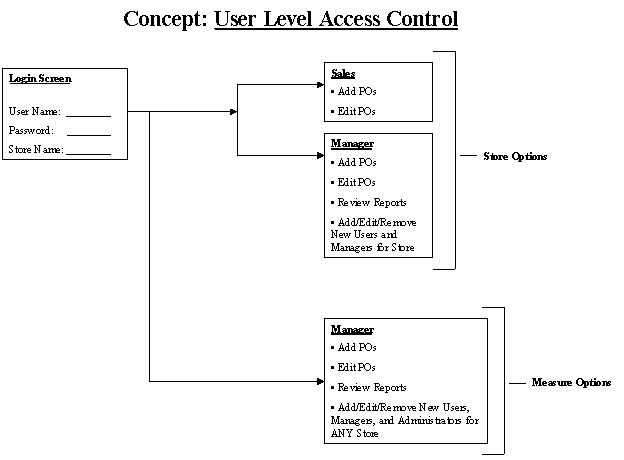
The store is
provided two levels of control the Sales person and the Manager. The Sales person can only enter and edit POs
for that individual and can not run reports.
The Manager can enter POs, add other Sales or Managers to the user list,
run reports on posted jobs and edit posted jobs.